Which embedded compiler: GCC, IAR or Keil?
The firmware you write is C. The thing that turns it into bytes sitting in flash is not one program — it’s a toolchain, a small assembly line of tools. Newcomers arriving from desktop development (or from an Arduino / STM32 “click Build” workflow) usually conflate three different things: the compiler, the IDE, and the debugger. Getting them straight is the difference between “it won’t build and I don’t know why” and knowing exactly which tool to poke. Let’s pull them apart.
What “compiling” actually is
Press Build and five tools run in sequence:
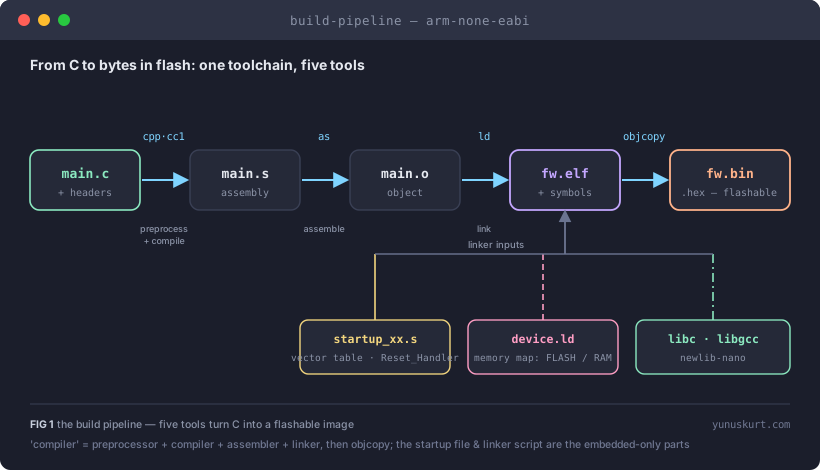 Figure 1 — “The compiler” is really a preprocessor, a compiler, an assembler and a linker, finished by objcopy. The startup file and linker script are the embedded-only parts a desktop C programmer never has to write.
- Preprocessor (
cpp) expands#includeand#define. - Compiler (
cc1) turns each translation unit into assembly. - Assembler (
as) turns assembly into a relocatable object file. - Linker (
ld) stitches the objects together with the C library — and with two files desktop programmers never see: the startup code (the reset handler and interrupt vector table) and the linker script (the memory map that says “FLASH starts at 0x08000000, RAM at 0x20000000”). Get the linker script wrong and the code compiles perfectly and then doesn’t fit, or jumps into nothing. objcopystrips the rich ELF down to the raw.bin/.hexa flash programmer expects.
Almost every “embedded-specific” build problem lives in those last two inputs, not in the compiler.
The compilers themselves
Four real choices turn C into Cortex-M machine code:
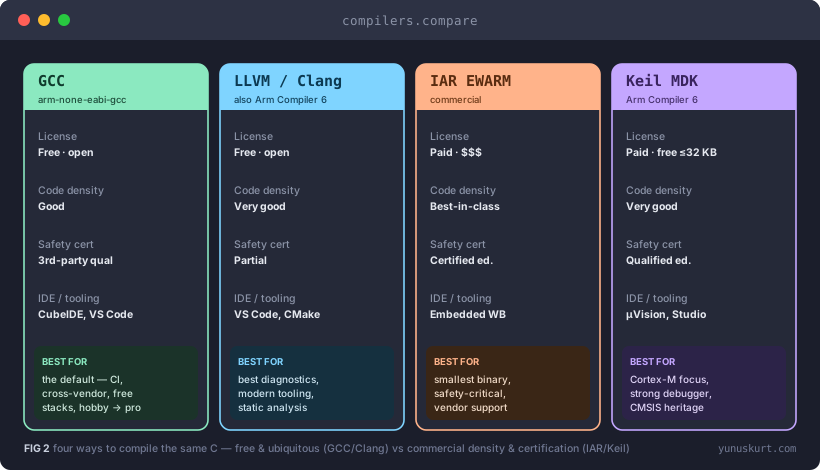 Figure 2 — Free and ubiquitous on the left (GCC, Clang); commercial density and certification on the right (IAR, Keil). Same C in, different binaries out.
GCC (arm-none-eabi-gcc) is the default and the one to learn first. Free,
open, everywhere, and the engine inside most vendor IDEs (including STM32CubeIDE).
It pairs with newlib / newlib-nano for a small C library, optimizes well enough
for the vast majority of products (-Os for size, -O2 for speed), and has the
largest community by a mile. If you have no specific reason to pay, this is the
answer.
LLVM / Clang is the rising alternative — famous for the clearest error
messages and the best static-analysis tooling, and increasingly used in embedded
flows. Notably, Arm Compiler 6 (armclang), the modern Keil compiler, is built
on Clang.
IAR Embedded Workbench (EWARM) is the premium commercial option. Its compiler is renowned for best-in-class code density — when the binary has to fit a tiny part, IAR often produces the smallest image — backed by strong commercial support, an integrated MISRA C checker, and safety-certified editions (ISO 26262, IEC 61508) that a functional-safety project can buy off the shelf. It costs real money.
Keil MDK centers on Arm Compiler 6 and the µVision IDE, and is the historical home of CMSIS (the Cortex-M hardware abstraction everyone uses). It has an excellent integrated debugger, strong Cortex-M focus, qualified editions for safety work, and a free tier limited to 32 KB of code — enough to evaluate, not to ship a big product.
The part everyone gets wrong: IDE ≠ compiler
Here is the confusion that trips up every newcomer. STM32CubeIDE is not a compiler. It’s a bundle.
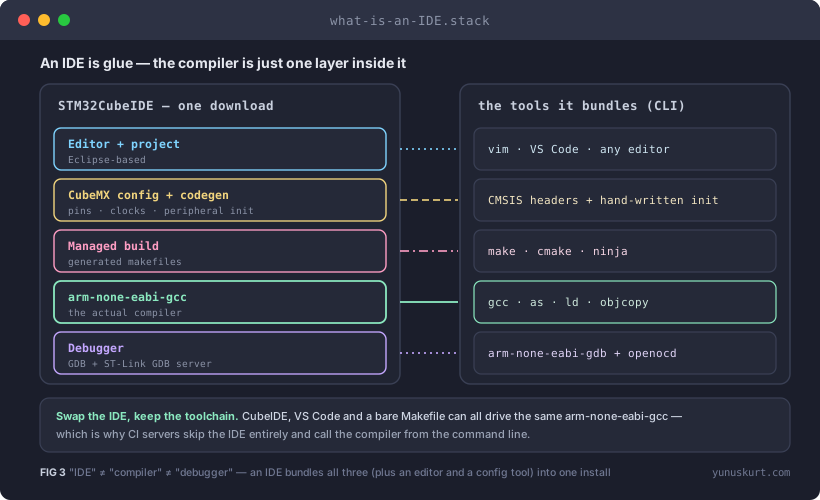 Figure 3 — An IDE glues an editor, a configuration tool, a build system, a compiler and a debugger into one install. The compiler is one layer — you can swap everything around it.
Unpack STM32CubeIDE and you find: an Eclipse-based editor, CubeMX (the
graphical pin/clock/peripheral configurator that generates init code), a managed
make build, plain arm-none-eabi-gcc doing the actual compiling, and a
GDB + ST-Link/OpenOCD debug stack. It’s free, and it’s a perfectly good way to
work — but the compiler inside it is the same free GCC you could call from a
Makefile.
Every vendor ships its own equivalent bundle: MPLAB X (Microchip, with the XC compilers), Code Composer Studio (TI), e2 studio (Renesas), ESP-IDF (Espressif, GCC/Clang + CMake), and the Arduino IDE (GCC under a friendly coat). And you can skip vendor IDEs entirely: VS Code + CMake, or PlatformIO, manage the toolchain while staying editor-agnostic.
The practical upshot: swap the IDE, keep the toolchain. CI servers do exactly this — they never open an IDE; they call the compiler from the command line.
Build systems and the command-line reality
Behind the Build button is Make, CMake or Ninja. Hobby projects can ignore this; professional ones can’t, because a reproducible release build has to run headless on a CI server with a pinned toolchain version — “it built on my machine with whatever GCC I had” is not a release process. Most serious teams keep the IDE for editing and debugging and a CMake/Make build for CI, so the two agree.
The debug toolchain (a separate stack)
Debugging is its own chain and a frequent source of “the compiler is broken” bug
reports that are nothing of the sort. The host runs GDB, which talks to a GDB
server — OpenOCD, ST’s ST-Link GDB server, or SEGGER’s J-Link — which
drives SWD/JTAG into the chip. For printf debugging, semihosting works but
halts the core on every call; SWO trace or SEGGER RTT give you real-time
output without stopping the CPU. None of this is the compiler’s job.
Choosing
- No special requirement → GCC. Via STM32CubeIDE if you want hand-holding, or VS Code + CMake if you want control. Free, portable, CI-friendly, works across every vendor’s Cortex-M.
- Smallest binary or best commercial support → IAR or Keil. When the part is tiny or a support contract matters, the license pays for itself.
- Functional-safety certification → IAR/Keil certified editions, or a qualified GCC (Solid Sands, HighTec) if you must stay on GNU.
- Modern diagnostics and static analysis → Clang/LLVM.
Field notes
- Pin the toolchain version. A reproducible build means the exact GCC/IAR build, recorded in the repo. Compilers change code generation between releases.
- “Won’t compile” and “won’t fit” are different tools failing. Syntax errors are the compiler; “region FLASH overflowed” is the linker and your linker script.
-Os+newlib-nanois the right default on small-RAM parts; fullnewlibprintfalone can blow your flash budget.- MISRA isn’t on by default. GCC won’t enforce it; IAR/Keil have built-in checkers, otherwise add a separate static analyzer. Don’t assume the compiler is policing your coding standard.
- IAR/Keil in CI need a license server reachable from the build agent — plan that into the pipeline, not the week before release.
- Semihosting halts the core. If your
printfmakes timing “mysteriously” change, switch to SWO or RTT before you blame the scheduler.