Updating firmware in the field: bootloaders & OTA
Writing the firmware is half the job. The other half is getting new firmware onto a device that’s already shipped — sitting in a wall, a vehicle, or ten thousand homes — without bricking it, and without letting an attacker flash their own code. That’s the bootloader-and-OTA problem, and it’s where a lot of otherwise solid products quietly fall apart. Let’s build it up properly.
What a bootloader is
A bootloader is a small program that runs first at reset. Its job: decide which application to run, optionally replace it, then hand over control. It lives at the start of flash; the application lives after it. When it’s done, it points the chip’s vector table (VTOR) and stack pointer at the app and jumps.
Everything starts with the memory map — the same linker-script knowledge that desktop programmers never need suddenly becomes the foundation:
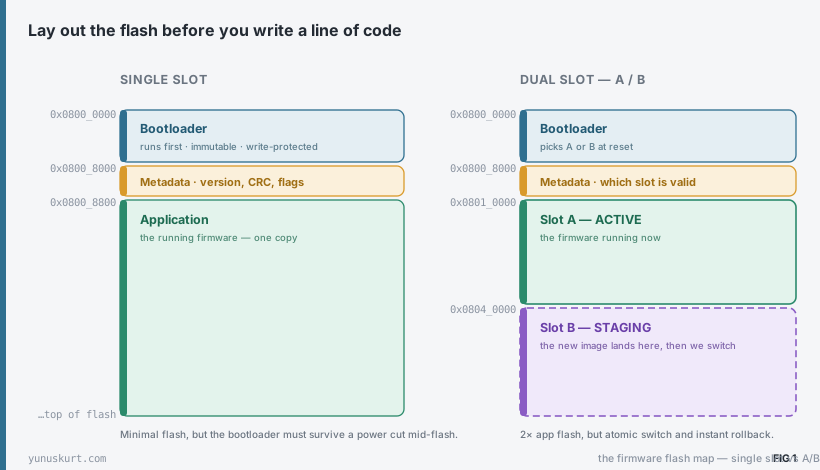 Figure 1 — Design the flash map first. A single slot is the smallest; an A/B layout costs double the application flash but makes updates atomic and instantly reversible.
The metadata region is the quiet hero: a few words recording the firmware version, a CRC or hash, and which slot is currently valid. The bootloader reads it on every boot.
Getting the image in: the transport is interchangeable
How the new image arrives is a detail you can swap: UART/XMODEM on a bench, USB DFU, an SD card, or true OTA over BLE, Wi-Fi, cellular or LoRa — and in vehicles, over CAN via UDS. The point is that the transport changes but the bootloader logic — where the image goes, how it’s checked, how the switch happens — stays the same. Design that logic once.
The golden rule, and why A/B wins
Here is the rule that separates a robust updater from a brick factory: never erase the running application until its replacement is proven good.
A single-slot design violates this by construction — to install the new image you must overwrite the old one, and a power cut mid-write leaves nothing runnable. It can be made safe (a fail-safe bootloader that detects the half-written app and re-requests the image), but it’s fragile.
A dual-slot A/B design follows the rule naturally: download into the inactive slot, verify it, flip a flag, reboot. The running app is untouched the whole time.
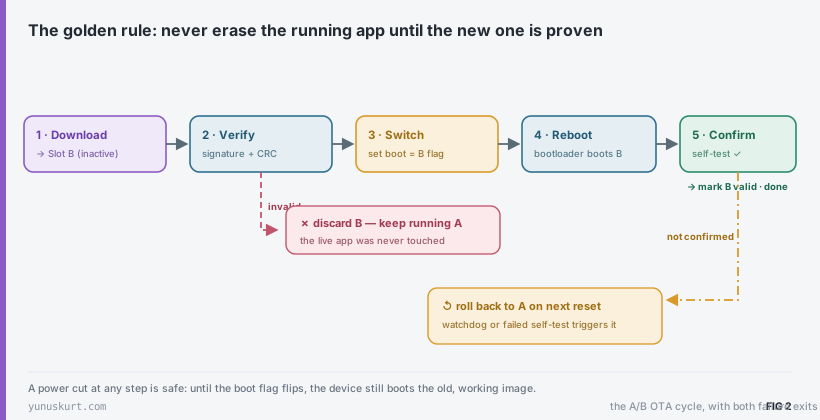 Figure 2 — Download, verify, switch, confirm — with two failure exits. A power cut at any point before the flag flips simply boots the old image again.
Two safety nets make this bulletproof:
- Atomic switch. The “which slot is active” decision is a single flag (ideally one flash word) written last. Before it flips, the device boots the old image; after, the new one. There’s no in-between state that boots nothing.
- Test-then-confirm. A valid image can still be bad (it boots but the new feature wedges). So the new app must actively prove itself — pass a self-test, pet a watchdog, set a “healthy” flag — within the first boot. If it doesn’t, the next reset rolls back to A automatically. Valid ≠ healthy.
Don’t let just anyone flash it
An updater that accepts any image is a remote-code-execution hole. The fix is secure boot: the device only runs firmware it can prove you authorized.
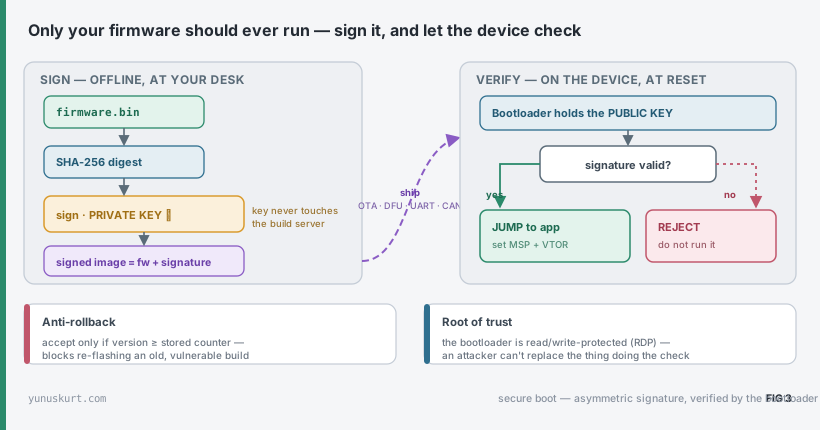 Figure 3 — Sign offline with a private key; the bootloader verifies with an embedded public key. Asymmetric crypto means the device can check authenticity without holding any secret an attacker could extract.
The layers, in order of how much they matter:
- Integrity (CRC / hash). Catches corruption — a dropped packet, a bad flash sector. Necessary but not security: anyone can recompute a CRC.
- Authenticity (signature). The real protection. You hash the image and sign it with a private key kept offline (ideally in an HSM, never on the build server). The bootloader holds the matching public key and verifies every image before running it. Bad signature → rejected.
- Anti-rollback. Stop a downgrade attack — re-flashing an old, validly signed but vulnerable build — by refusing any image whose version is below a stored counter.
- Confidentiality (optional). Encrypt the image if the firmware itself is IP worth protecting.
All of this rests on a root of trust: the bootloader doing the checking must itself be immutable. Lock it with the MCU’s read/write protection (RDP on STM32) so an attacker can’t simply replace the thing that enforces the rules.
Field notes
- Design the memory map before anything else. Slot sizes, alignment to flash sectors, where metadata lives — changing it later means re-flashing every unit by hand.
- Implement rollback before you implement OTA. A one-way updater is worse than no updater; the day a bad image ships, rollback is what saves the fleet.
- Test power-loss at every step. Pull the plug during download, during the flag write, during the first boot. If any of those bricks the device, the design is not done.
- Keep the bootloader tiny and boring. It’s the one piece you can’t easily fix in the field — every feature you add is a bug that can’t be patched. Protect it, and resist the urge to grow it.
- Sign offline; never put the private key on CI. A leaked signing key means attackers can ship firmware your whole fleet will trust. Treat it like the crown jewel it is.
- Always leave a recovery path. A button-held-at-reset or a UART command that forces the bootloader to wait for a fresh image means a field unit with a bad config is recoverable, not scrap.
- Updating the bootloader itself is the hard problem — it’s a chicken-and-egg with no second copy of it running. If you must, a tiny immutable first stage that can swap the rest is the usual answer; otherwise, get the bootloader right the first time.