DMA: free the CPU from moving bytes
Ask a microcontroller to read a fast ADC, receive a high-baud UART stream or push a display buffer over SPI, and the naïve firmware does it one byte at a time — the CPU reading a register, writing to memory, looping. At a few kHz nobody notices. At a few MHz the core is doing nothing but shuffling bytes, and your actual application starves. DMA — Direct Memory Access — is the fix, and it’s the single biggest “free” performance lever in embedded. A small dedicated engine moves the data while the CPU does real work, or sleeps.
The core is too valuable to be a courier
A DMA controller is a second bus master sitting next to the CPU. It can read and write memory and peripheral registers on its own. The whole idea is to take the processor out of the data path:
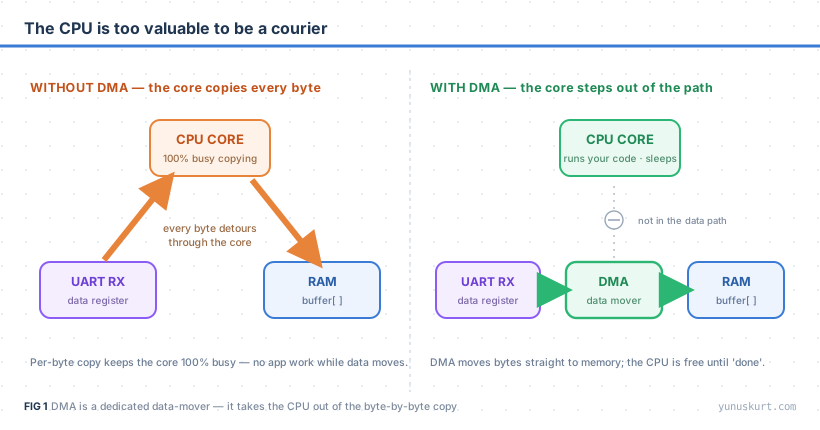 Figure 1 — Without DMA every byte passes through the core. With DMA the bytes go peripheral → memory directly; the CPU only sets the transfer up and is free until it finishes.
That’s the entire value proposition. Everything else — throughput, determinism, low power — falls out of this one structural change.
What it actually costs the CPU
The payoff is easiest to see on a timeline. Move the same block of bytes two ways:
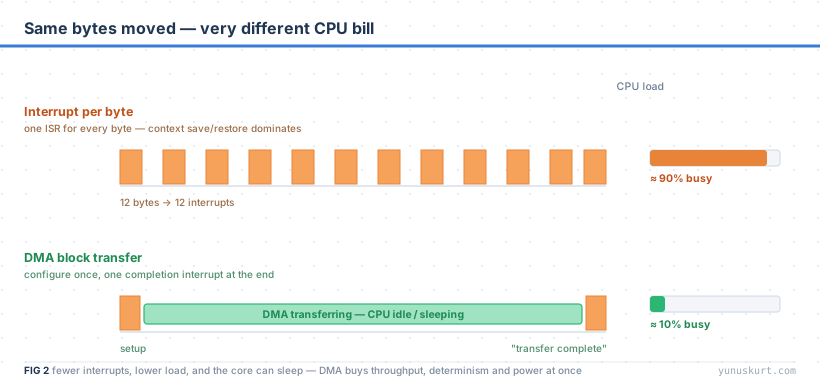 Figure 2 — Interrupt-per-byte spends most of its time saving and restoring CPU context. DMA configures once and interrupts once — the core is free in between, and can sleep.
An interrupt-per-byte scheme pays the interrupt entry/exit cost on every single
byte — register stacking, vectoring, unstacking — which often dwarfs the one
useful mov. DMA pays that cost twice for the whole block: once at setup, once at
“transfer complete.” Three wins in one move:
- Throughput. The data moves at bus speed, not at “however fast the ISR can turn around.” High-speed SPI, SD cards, parallel displays and fast ADCs are simply not feasible byte-by-byte.
- Determinism. A UART at high baud will drop bytes if an ISR is ever late. DMA into a buffer can’t be late — there’s no per-byte software in the loop.
- Power. While DMA runs, the CPU can enter a sleep mode. On a battery device that’s the difference between days and weeks. (This pairs beautifully with an RTOS idle task that sleeps the core.)
How a transfer works
You don’t move data with DMA; you describe a transfer and let hardware execute it:
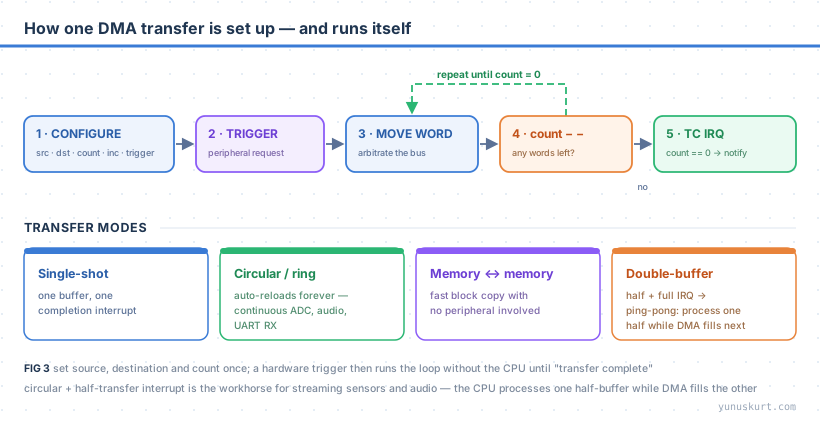 Figure 3 — Set source, destination and count once; a hardware trigger runs the loop without the CPU until it’s done. The mode you pick decides what happens at the end.
The setup is a handful of registers: source address, destination address, count, whether each side’s address increments (memory yes, a peripheral data register no), the transfer width (byte/half-word/word), and the trigger (a peripheral request line, or software for memory-to-memory). After that, each peripheral request makes the DMA arbitrate for the bus, move one unit, decrement the count, and repeat — until the count hits zero and it raises an interrupt.
The mode is where the real power lives:
- Single-shot — one buffer, one completion interrupt. The basic case.
- Circular / ring — the count auto-reloads and the address wraps, so the transfer never stops. This is the workhorse for continuous ADC sampling, audio and UART RX — the data just keeps landing in your ring buffer.
- Memory-to-memory — a fast block copy with no peripheral involved (a hardware
memcpy, useful for big moves). - Double-buffer / ping-pong — with the half-transfer and full-transfer interrupts, the CPU processes the first half of the buffer while DMA is still filling the second, then swaps. This is how you stream and process at the same time without ever dropping a sample.
The gotchas that actually bite
DMA’s reputation for being “tricky” is really five specific traps:
- Cache coherency (Cortex-M7 and up). With a data cache, the CPU and DMA can see different memory. Before a memory-to-peripheral transfer you must clean the cache (push CPU writes out to RAM); after a peripheral-to-memory transfer you must invalidate it (drop stale cached copies) — or place DMA buffers in a non-cached MPU region. This is the number-one “DMA returns garbage” bug.
- The request mapping. Each peripheral is wired to specific DMA streams/channels — you can’t pick arbitrarily. The mapping table in the reference manual is mandatory reading; two peripherals fighting for one stream silently fail.
- Enable the peripheral’s DMA request. The DMA being configured isn’t enough —
the peripheral has to be told to raise requests (e.g. the UART’s
DMAR/DMATbits). Forgetting this is the classic “everything looks right and nothing moves.” - Bus arbitration. DMA and CPU share the bus matrix. A flood of DMA traffic can stall the CPU (and vice versa); on parts with multiple buses, put the DMA buffer in a RAM bank the CPU isn’t hammering.
- Buffer handoff.
volatilekeeps the compiler honest but doesn’t order hardware; on cached or multi-master parts you need the right barriers and you must not touch a buffer the DMA still owns. Use the half/complete interrupts to know who owns what.
When to reach for it
Almost always, once a peripheral moves data faster than “occasionally.” Reach for DMA when: a UART/SPI/I2C runs fast enough that per-byte interrupts hurt; an ADC samples continuously; a display or SD card needs block transfers; or the device must sleep while data flows. The setup is a few registers and one interrupt handler — a tiny price for handing the courier job to dedicated hardware and giving the CPU back to your application.
Field notes
- Circular mode + half-transfer interrupt is the pattern to learn first. It solves continuous ADC, audio and serial RX in one idiom.
- Put DMA buffers in their own, correctly-aligned, ideally non-cached region on M7 parts and the cache problem disappears by construction.
- Count is in units, not bytes — if the width is half-words, a 100-sample buffer is count 100, length 200 bytes. Mixing these up truncates your data.
- Check the request map before writing a line of code — half of “DMA won’t trigger” is a wrong stream/channel for that peripheral.
- Measure the bus, not just the CPU. If DMA throughput is below expectation, you’re probably contending with the core for the same RAM bank.